
Fleet vehicles: how to hire and operate
Discover all you need to know about hiring and operating fleet vehicles, including fuel, tolls, infringements and emergency procedures.
Hire a pool vehicle
The Fleet Team endeavours to provide safe, reliable and efficient transportation for all members of UQ who utilise our fleet.
The team are happy to advise which vehicle can best meet the needs of your project or task and can be reached by phone or email. We have several low or zero-emission vehicles and would encourage all fleet users to consider if these are viable for you.
Pool vehicles are available for:
- students undertaking project-related activities
- staff conducting work-related tasks.
To hire a UQ pool vehicle, you must be an authorised driver and have approval to hire.
Follow these steps:
- Register as an authorised UQ driver:
- Download and complete the PF323 Authority to Operate UQ Vehicles form (RTF, 418.8 KB)
- Lodge the form with your faculty, school or centre for approval.
- Choose which vehicle to book and submit a request:
- book a pool vehicle by downloading and completing a PF322 Requisition for Booking a Vehicle (PDF, 176.5 KB) and email it to Fleet Services at transport@uq.edu.au
- reference the below table for vehicle types and costs.
Vehicle types and costs
Hiring a UQ pool vehicle incurs fees. Any rental less than 4 hours will be charged as half a day.
| Vehicle type | Total in fleet | Seats incl. driver | Engine type | Make and model | Image | Cost per day | Cost per half day | Charge per kilometre |
|---|---|---|---|---|---|---|---|---|
| Hybrid hatchback wagon | 2 | 5 | Petrol hybrid | Kia Niro | Kia Niro Hybrid Wagon (JPG, 190.6 KB) | $105 | $52.50 | $0.12 |
| Electric sedan short/long range | 2 | 5 | Electric | Tesla Model 3 | Tesla Model 3 Electric (JPG, 188.7 KB) | $145 | $72.50 | $0.06 |
| Hybrid sedan | 2 | 5 | Petrol hybrid | Toyota Camry | Toyota Camry Hybrid (JPG, 214.1 KB) | $145 | $72.50 | $0.14 |
| 2WD hybrid wagon SUV | 1 | 5 | Petrol hybrid | Toyota RAV4 | Toyota RAV4 (JPG, 36KB) | $145 | $72.50 | $0.23 |
| 4WD hybrid wagon SUV | 3 | 7 | Petrol | Mitsubishi Outlander | Mitsubishi Outlander (JPG, 204.7 KB) | $145 | $72.50 | $0.23 |
| Van | 3 | 2 | Diesel | Hyundai Staria Load | Hyundai Staria (JPG, 194.7 KB) | $150 | $75 | $0.30 |
| 2WD single cab utility | 1 | 2 | Petrol | Toyota HiLux | Toyota Hi Lux Extra Cab (JPG, 135.4 KB) | $120 | $60 | $0.30 |
| 2WD double cab utility | 1 | 4 | Petrol | Toyota HiLux | Toyota Hi Lux Double Cab (JPG, 200.6 KB) | $130 | $65 | $0.35 |
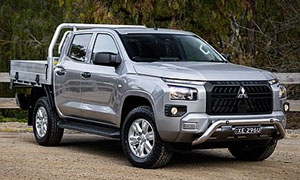
| 4WD utility | 1 | 5 | Diesel | Mitsubishi Triton | Mistubishi Triton (JPG, 41KB) | $155 | $77.50 | $0.35 |
| People mover | 3 | 8 | Diesel | Kia Carnival | Kia Carnival (8 seat) (JPG, 243.9 KB) | $160 | $80 | $0.20 |
| Minibus | 2 | 12 | Diesel | Toyota HiAce Commuter | Toyota minibus (JPG, 68.7 KB) | $170 | $85 | $0.30 |




Tesla Model 3
To encourage the use of our fully electric and zero-emission Tesla sedans we have recently lowered the hire cost of both vehicles. If you are travelling less than the distances listed below, consider if an electric car would be suitable for your trip.
Features
- Standard Range: single motor, 2WD, ~400 km on full charge
- Extended Range: dual motor, AWD, ~500+ km on full charge
- Both vehicles are zero-emission.
Training
- Fleet Services can walk you through a brief tutorial on request
- Review the Tesla owners’ manual overview (also accessible on the car’s main screen).
Charging
- EV charging stations are available at St Lucia and Gatton
- Learn more about electric vehicle charging stations.
Manage infringements, parking and tolls
Infringements
Notices are sent to Fleet Services for processing. The driver at the time of an infringement is responsible for payment.
Fleet Services will notify the vehicle custodian when an infringement is received. The driver must provide a statutory declaration to the Department of Transport and Main Roads (TMR).
The statutory declaration will be attached to correspondence from Fleet Services and must be completed to avoid further fines and charges.
Parking
You can park UQ fleet vehicles in any zone but must follow all other parking rules.
Tolls
- Pool vehicles – Toll tags fitted, driving on toll roads unrestricted. Charges are logged in Archibus.
- Departmental vehicles (staff only) – Order a toll tag from Linkt at departmental expense.
Use a fuel card
To get a fuel card (staff only)
- Contact Fleet Services on 0408 380 487 or email transport@uq.edu.au
Where to use
- Shell, Ampol and BP service stations
- Transport Office (8209), Gatton campus
Report your card usage
- When paying, enter the odometer readings at point of sale
- Each month, Fleet Services will upload your fuel usage data to Archibus and charge your vehicle account
Lost or damaged cards
- If your card is lost, stolen or damaged, contact Fleet Services immediately on 0408 380 487 or email transport@uq.edu.au
Get vehicle servicing and emergency help
Servicing
Fleet Services maintains all UQ vehicles. They log all services in Archibus, which eligible users can view. Fleet Services also write windscreen stickers recording when the next service is due.
Vehicle breakdowns
All UQ vehicles are covered nationwide by RACQ Fleet Care.
If your vehicle breaks down:
- phone RACQ on 1800 648 058
- provide UQ’s service number (this is on the key tag in the glove box).
For breakdown safety, read the PF631 Vehicle Emergency Procedures (PDF, 357.2 KB) in the glovebox.
Vehicle accidents
If you are in an accident, here's what you should do:
- stop and exchange details with other parties
- do not admit fault or discuss negligence
- record registration and make of vehicles involved
- note location, time, and road conditions
- record witness names/addresses
- photograph damage
- report the accident to the police if required
- keep damaged property/items for possible inspection.
For more information, check your glovebox for the PF631 Vehicle Emergency Procedures (PDF, 357.2 KB) or print this page.
Lodging a claim
If the UQ vehicle you’re using is damaged in an accident, you must lodge a claim.
In the event of an accident or to lodge a claim, follow the instructions on the UQ Insurance Services website. Please note that the process may differ for ‘glass only’ and other types of damage claims.
You can contact UQ Insurance Services with any questions about your motor vehicle incident:
- phone them on (07) 3365 3075
- or email insuranceclaims@uq.edu.au.
You may need to pay an excess of $2,000. If the repairs cost less than the excess, we may cancel the claim and pay the repairer directly.
- If you wish, you can download and print the Motor Vehicle Fleet Claims Procedures (PDF, 92.3 KB)
- For full details of UQ’s insurance procedure, see Insurance Coverage and Management of Claims Procedure.